You open Merchant Center and the product count looks wrong. A client asks whether the product pages need new copy. Before touching the pages, find out whether Google received the products at all.
A product may be missing because the file did not load, it is hidden or archived, it has not finished review, or Google cannot open its page. Each needs a different fix.
First, write down what “missing” means
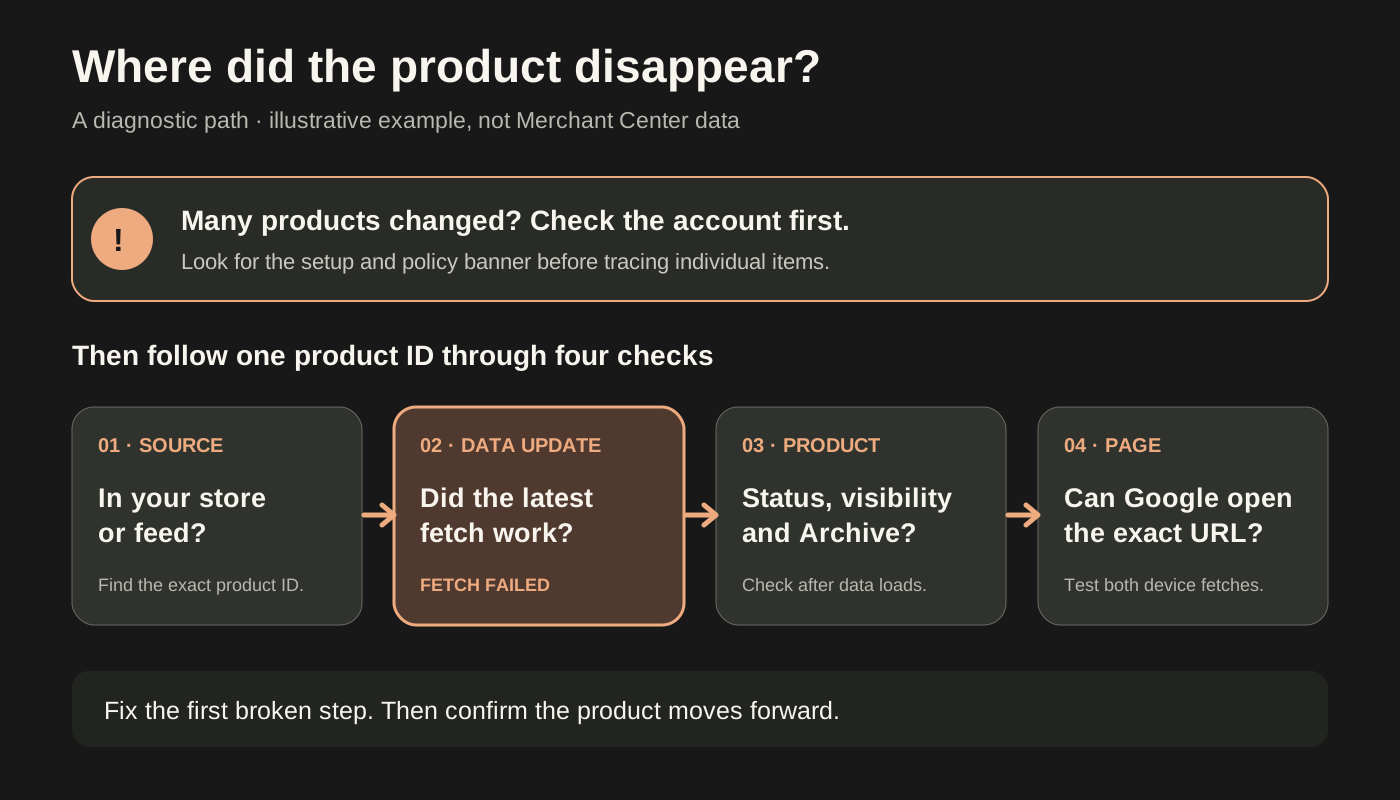
Pick one affected product and record its product ID, page URL and when you last saw it listed. Then ask:
- Is it in your raw feed or connected store?
- Is it under All products or in the Archive folder?
- What do its Status and Visibility columns show?
- Can Google access the landing page?
Rule out the quick causes first:
- Processing: An edited product may take up to 15 minutes to process.
- Under review: Reviews typically take up to 3–5 business days for Shopping ads and free listings.
- Hidden or archived: Hidden products stop showing and are archived automatically after 14 days. Check the Archive folder; you can restore a product there.
- Needs Update: This appears 30 days after the last product-data update. It is an indicator, not an approval status. Leaving data stale can reduce visibility and eventually remove products from Merchant Center.
Do not rely on the overall count alone. Merchant Center Next and Merchant API can count products differently when products are sold in multiple countries. Trace a product ID before calling the difference a loss. Google: Product visibility and status
If it is in the feed but not in All products, inspect the upload
In Merchant Center, open Settings → Data sources, select the source and check Latest update. Look for a failed fetch, formatting error or incomplete processing. A scheduled fetch can fail if Google cannot access its URL. Once you fix the source, re-upload it or use Update to trigger a refresh. Processing may take a few minutes to a few hours, depending on file size.
The processing report checks basic file and data issues only. Also open Products & store → Products → Needs attention for product and account issues. Rewriting a product description will not repair a failed feed fetch. Google: Troubleshoot my data source · Google: Check your product data
If it is in All products, read status and visibility together
Merchant Center has five approval statuses: Under review, Processing, Approved, Limited and Not approved. The first two can be temporary. Limited means a product may show only in some situations; Not approved means it cannot show until the blocking issue is fixed. Visibility is a separate control: a product can be hidden even if its approval status looks healthy.
Open Needs attention for the affected product. The problem may be with the product data, a policy or the online store. Filter or download affected items if several share the same issue. Fix the issue shown instead of making a sitewide copy change based on one product. Google: Product visibility and status · Google: Issues in Merchant Center
If many or all products change at once, check account-level issues before tracing individual items: product-level issues affect individual products, while setup and policy issues can affect every product in the account. An unresolved warning can lead to suspension, and Google may suspend an account without warning for some serious issues. Look for a banner at the top of Merchant Center or go to Products & store → Products → Needs attention → View setup and policy issues. Google: Issues in Merchant Center
If the product page is unavailable, identify the error
Google disables products when it cannot access their submitted landing page; they stop showing in ads and free listings until it can reach the page. Its examples include a 404, more than two redirects, a 5xx response or failed connection, an unreachable robots.txt file, a hostname that does not resolve, and a URL protocol or domain that does not match the verified domain.
Test the exact URL submitted for the product with Google's URL Inspection tool, checking smartphone and desktop fetches. If the submitted link is wrong, correct it in Merchant Center or the feed. If the site is failing, fix the site. Check whether robots.txt or a security rule blocks Googlebot. For broken product URLs, see which 404s to fix; for bot-access checks, see how to verify Googlebot before changing rules.
After the fix, go to Products & store → Products → Needs attention → Product page unavailable → View fix → Request website check. You may need to turn off Prioritized fixes and select Show all fixes to find the issue. Google says a review may take up to 12 hours; you cannot submit another request during that time. An automatic review will happen later if you do not request one. Google: Fix product page unavailable
A worked example
Illustrative example, not a client result. A shop's export contains 500 products. Merchant Center shows 430 under All products. The other 70 were added this week. The latest scheduled fetch failed because its URL requires a login, so those new products never loaded.
The next action is to make the data source reachable, select Update and wait for processing. Then check status, visibility and landing pages for the 70. There is no evidence yet that their descriptions need rewriting.
What to report to the team
For a sample of affected products, record the ID, source, latest upload result, status, visibility, page-access result, owner and next check date. Report what you observed, not “Google dropped our products,” until you know which step failed.
If many products change at once, check the Merchant Center status dashboard too. It shows service status for Merchant Center and related services. A notice is a reason to investigate, not proof that a platform issue caused your account's drop. Google: About the status dashboard
The rule is simple: trace one product from source to upload to status and visibility to page access. Fix the first broken step, then confirm the product moves forward.
Need help sorting a wider product-visibility problem? Book an SEO discussion and bring a few affected product IDs and URLs.
Sources: Product visibility and status · Check your product data · Troubleshoot my data source · Issues in Merchant Center · Fix product page unavailable · About the status dashboard
Reviewed 8 November 2026.
Official Google Merchant Center guidance checked 8 November 2026. The worked example and diagram are illustrative, not client results.

Senior SEO, AEO & GEO consultant and practitioner. I write about search strategy, the tools I build and lessons from hands-on work.
More about my work →Need help with a wider search challenge? Explore SEO consulting.