You have a spreadsheet full of keywords. Some look almost identical. Others have attractive numbers. The harder question is still open: which page should answer each search, and what should you work on first?
The useful output of keyword research is a small page plan, not a longer keyword list. This guide takes you from a starting topic to a decision for each group: improve an existing page, create a distinct page, or leave the idea out. The companion workbook gives you a worked example and space for your own plan.
In brief: choose an audience and task, gather the language they use, inspect current search results, group related questions by the page that could answer them, then decide what to improve, create or skip. Record your evidence and revisit the plan after publication. If you are planning 2027 content now, use current evidence as a starting point and check it again when the year begins.
What matters when planning keyword research for 2027?
People may ask a search engine or an AI assistant a broad question, then refine it with follow-ups. That makes the whole task more useful than a single exact phrase. You still need the words people use: they help you name a page, answer its main question and connect it to related pages. But a list of phrases alone cannot tell you whether the best response is a guide, a comparison, a product page or an update to something you already have.
There is no separate keyword or schema trick that makes a page appear in Google's AI features. Google's AI search guidance points publishers back to its existing search practices. Treat AI follow-up questions as possible reader needs to investigate, not as proof of search demand or a promise of citation.
First, define the reader and the task
Write one sentence before opening a keyword tool: “I want to help [audience] do [task] in [market].” This keeps the research tied to a real service or reader need.
For a fictional example, imagine a garden shop helping apartment residents grow herbs on a balcony. Its starting topic is “balcony herb garden.” The shop sells planters and has a basic product category page, but no practical growing guide. These details are invented to show the method; they are not a client case or a measured opportunity.
A keyword is the wording someone types into a search engine. Search intent is the task they may be trying to complete. You cannot know every searcher's intent from the words alone, but the phrase, the current results and your own audience give you useful clues.
Collect phrases without treating every source as a demand forecast
Start with language you already hear from customers: questions in emails, sales calls, site search or support conversations. Then look at your current Search Console queries and relevant search suggestions. A research tool can add variations and estimates, but note its market, date and data source before using a number to prioritise work.
Search Console shows searches where your site appeared, not every possible search in your market. Some queries are omitted for privacy, so its list is not a complete keyword universe. Google's Search Console data guidance.
In the workbook, record the exact phrase, where you found it and the date. Leave search volume blank if you did not validate it. Do not fill the column with invented numbers or treat a tool estimate as guaranteed visits.
A practical collection pass
Use several sources, because each answers a different question:
| Source | What it can reveal | What it cannot prove |
|---|---|---|
| Customer questions, sales notes and site search | The language and problems of people you already serve | How often the wider market searches |
| Search Console queries and pages | Where your site has appeared and which existing URLs may need attention | The full market or every query Google saw |
| Search suggestions and related questions | Possible wording and follow-up needs | Search volume or commercial value |
| A keyword tool or Google Ads Keyword Planner | Directional variations and estimated demand in a selected market | Guaranteed organic visits or an easy ranking |
| Competitor pages and current search results | Which page formats and answers searchers can already find | A requirement to copy a competitor's structure |
For one seed topic, collect a manageable set of phrases. Keep the raw wording, source, date and target country or language. Remove obvious duplicates, but keep different meanings. For the fictional garden shop, “balcony herb planters” and “balcony herb garden ideas” belong on the same research sheet even though they may lead to different pages.
Read numbers with their labels attached
If you use Google Ads Keyword Planner, check the location, network and time range. Its average monthly searches are rounded estimates; its competition field describes advertiser competition, not organic ranking difficulty. Google Ads metric definitions.
Google Trends shows relative interest after normalising the selected place and period to a 0–100 scale. A score of 50 is not 50 searches. A low-volume term can show zero, and a news spike may fade. Compare like periods and markets before using a trend to change your plan. Google Trends FAQ.
Use these figures to ask better questions. Do not add estimated volumes from different tools as though they were measured on the same basis. A low-volume phrase can still matter when it describes a valuable, specific problem you can answer well.
Inspect the results before deciding the page
Search three to five representative phrases in the market you serve. Record the date, location and whether you used a mobile or desktop view. Search results change, so this is a snapshot rather than a permanent statement of intent.
For each phrase, ask:
- What does the searcher appear to want next? Learn, compare, buy, troubleshoot or reach a known site?
- What kinds of pages appear? Guides, category pages, videos, local listings or product pages? Notice when results are mixed.
- What does a useful answer require? A worked example, firsthand test, price, current documentation, images or a short direct answer?
- Can your site contribute something better grounded? A clear method, original evidence, a useful tool or expertise that belongs to your business?
Do not choose a page type just because the top result uses it. The results are evidence about the task, not a template to copy. If “balcony herb planters” mostly leads to shopping pages while “how to start a balcony herb garden” leads to guides, that supports separate page jobs. If results are mixed, keep the decision provisional and inspect more examples.
Group phrases by the answer they need
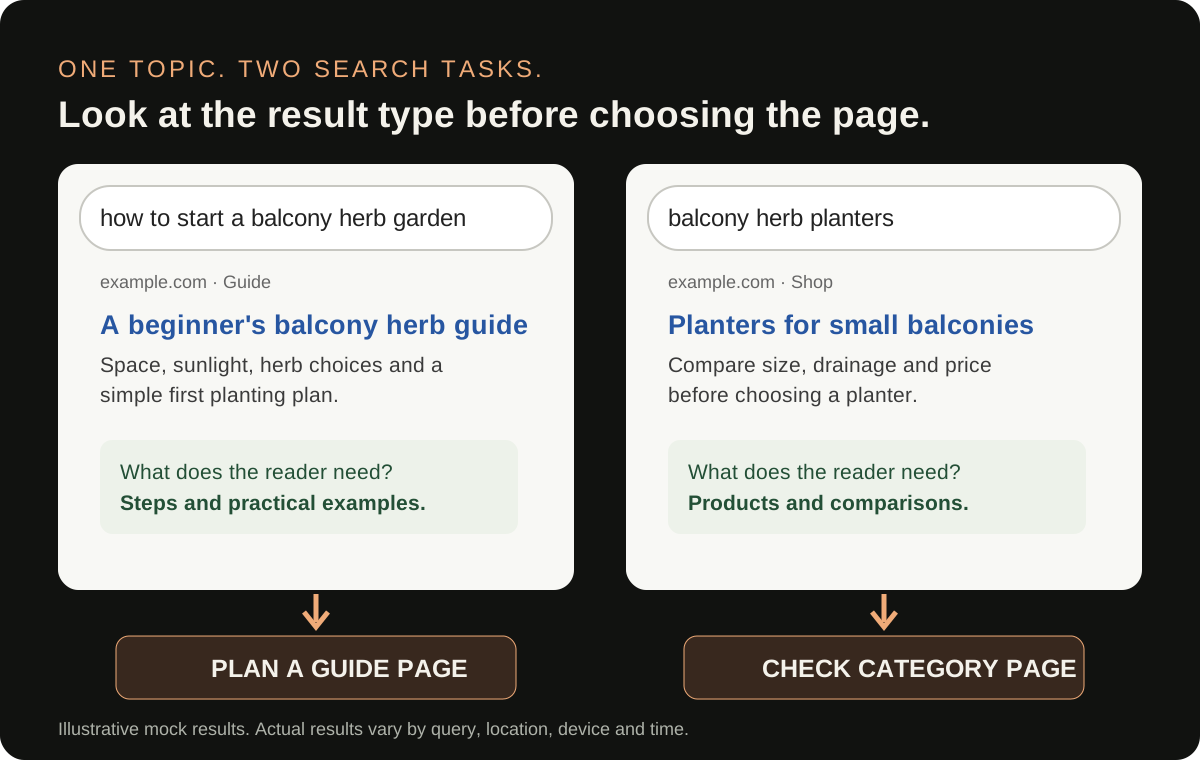
Read each phrase as a question from a person. Would one useful page answer it well, or would the reader need a different page type?
Here is the fictional garden-shop example. The phrase list is illustrative, with no claim about real search volume or rankings.
| Phrase | Likely reader task | Page decision | Why |
|---|---|---|---|
| balcony herb garden ideas | Plan a small herb garden | One practical guide | Needs layout, plant choices and examples |
| best herbs for a balcony | Choose suitable herbs | Same guide, with a clear section | Closely supports the planning task |
| how to grow basil on a balcony | Grow one herb successfully | Review as a separate guide later | The care steps may deserve more depth |
| balcony herb planters | Shop for a planter | Existing category page | A product selection task, not the guide's job |
| balcony garden jobs | Find employment | Exclude | Different audience and purpose |
This is a working hypothesis, not an automatic cluster. Check representative search results in the target market. If the results for two phrases serve different tasks or page types, keep them separate even when the words overlap. If the same guide could satisfy both without becoming unfocused, map them together.
Test whether two phrases deserve one page
Write a one-sentence answer promise for each phrase: “After this page, the reader can ____.” If the promises match and one coherent page can fulfil both, group them. If one promise is “choose a planter to buy” and the other is “learn to grow herbs,” separate them. You can also compare the types of pages appearing for both phrases. Similar results strengthen the case for one page; different result types are a reason to inspect further, not an automatic rule.
Do not create a page for every related search question or every AI-generated follow-up. Add a question to a page when answering it helps complete that page's main task. Hold the rest for a different page or later research.
Check your site before proposing a new URL
For each group, search your own site and record the best existing page. Read it. Does it answer the task, or does it merely mention the phrase?
Choose improve when an existing page has the right purpose but lacks a useful answer, example, comparison or next step. Choose create when the task is distinct and no suitable page exists. Choose hold when evidence is thin or the page's purpose is not yet clear. Choose exclude when the phrase is outside your audience or offer.
The garden shop should not add a “best herbs” article simply because it found a second phrase. A section within its balcony guide may be the better first answer. Its planter category should remain a shopping page. One page can link to the other where the link helps someone move from planning to buying.
Before choosing create, check whether you already have a page that search engines and readers would see as the answer. Use your site navigation, internal search and Search Console page rows. If two existing pages already serve the same task, compare their content and performance before adding a third. The remedy may be to improve one page, clarify their distinct purposes or consolidate overlapping material with an appropriate redirect. Do not redirect a page just because two titles share words; review its audience, links and useful content first.
Google advises using words people would use to find content in prominent places, but also recommends people-first content that helps readers complete their task. A mapping sheet helps you balance both: use the reader's language naturally and give each page a clear job. Search Essentials; people-first content guidance.
Turn the group into a page brief
For every page you will improve or create, write a brief that a writer or editor can act on:
- Reader and task: Who is this for, and what will they do after reading?
- Page type and URL: Guide, service page, comparison or product category; existing URL if improving.
- Main question: The answer the page must deliver early.
- Supporting questions: Only those that help the same task.
- Evidence needed: Product facts, expert review, photos, examples or sources to verify.
- Next step: A useful internal link or action for the reader.
For the example guide, the main question is “How can I start a balcony herb garden in a small space?” Supporting questions include which herbs suit the space and how to arrange planters. The writer would need to check growing advice with a knowledgeable source and use real photos if available. The product category link belongs where readers are ready to choose a planter.
Here is what a handoff could look like for that fictional guide:
| Brief item | Draft decision |
|---|---|
| Reader and outcome | An apartment resident can choose a few suitable herbs and plan where to place them |
| Main page | A beginner guide to starting a balcony herb garden; final URL chosen after checking the site |
| First answer | Explain the minimum space, light and container decisions before listing ideas |
| Supporting sections | Herb choices, a simple layout, watering basics and common constraints |
| Evidence to gather | Growing advice reviewed by someone knowledgeable; actual product dimensions and photos if used |
| Helpful next step | Link to the existing planter category when the reader is ready to choose one |
This is a content brief, not a claim that the shop sells suitable products or has verified gardening expertise. Those details must be checked before publication.
Do not turn the brief into an instruction to repeat an exact phrase a certain number of times. Explain the task and support the answer.
Prioritise the next useful page, not the largest-looking number
Score each proposed action in plain language. Is it relevant to the audience? Does it support a real service or product? Can you provide a credible answer? Does the page already exist? What effort and evidence are needed? A relevant improvement to an existing page can be more sensible than another new article.
Assign an owner and a review date. If the decision depends on missing product facts or demand evidence, record that dependency instead of pretending the idea is ready.
Use three working queues rather than a single numerical score: do now when the task fits your audience and you have the evidence to answer it; investigate when the task matters but intent, demand or expertise is uncertain; skip when it is unrelated. Within “do now,” consider whether a useful existing page can be improved before commissioning a new one. Write the reason beside each decision so a teammate can challenge it.
The keyword-to-page workbook makes that handoff visible: a worked example, a blank mapping area and an action column.
Check whether the plan is working
After you publish or improve a page, record its URL and change date. In Search Console, review whether the page is indexed, which queries and pages receive impressions and clicks, and whether the terms match the task you intended. Compare complete periods and allow for reporting delay. Small numbers can be noisy; an impression alone does not establish that the page meets the reader's need.
Also inspect the page itself: can a beginner find the main answer, use the example and take the next step? Search Console can show discovery and clicks, but it does not tell you whether someone completed the task. Use appropriate on-site feedback or qualitative review for that question. If unexpected queries appear, decide whether they belong in the current page, need another page, or are simply irrelevant. Our Search Console query guide walks through that choice.
How should you update the plan during 2027?
Keep the page map and its evidence, rather than freezing a “2027 keywords” list today. Before the new year, repeat the collection and results check for the markets that matter. Revisit pages whose facts, tools, prices or examples have changed. Look for new reader questions in customer conversations and Search Console. Update a page's year only when its content has actually been reviewed and the year helps the reader understand its freshness.
This method can help you answer “how to do keyword research in 2027” when 2027 arrives. It does not assume which AI features, result layouts or query volumes will exist then. A dated title should be earned by a dated review, not by swapping a numeral.
Common mistakes to catch before publishing
- One page per phrase: Similar wording can describe one task. Review the reader's need first.
- One page for every task: A guide, a service page and a product category may each need different jobs.
- Volume without context: Estimates are not guaranteed traffic, and a large phrase can be irrelevant.
- Ignoring existing pages: Map the current URL before suggesting a new one.
- Guessing the answer: Identify the facts, examples and expertise the page will need.
- Building before deciding priority: Assign a reason, owner and next action so the sheet is usable.
Your completion check
Your research is ready to hand over when each kept group has a reader task, a proposed page or existing URL, a decision, a reason and an owner. The page brief should tell someone what a good answer requires. Excluded and held ideas should remain visible with a reason, so they do not quietly return as duplicate assignments.
This plan does not guarantee rankings, traffic or AI citations. It makes the content decision explicit and reviewable. After publication, use Search Console and reader feedback to learn whether the page is being found for relevant searches and whether its answer needs improvement.
For a related decision on phrases already appearing in your reports, read what to do with new Search Console queries. If you need help turning a messy research export into a focused plan, book a 30-minute discussion with the page list and your main question.
Sources: Google Search Central AI features, Search Essentials and Search Console documentation; Google Ads Keyword Planner metric definitions; Google Trends FAQ. Garden-shop example is fictional. Reviewed 4 November 2026.

Senior SEO, AEO & GEO consultant and practitioner. I write about search strategy, the tools I build and lessons from hands-on work.
More about my work →TAKE THE NEXT STEP
Put the questions to work.
Use the free content audit planner or discuss a focused review of one important page.
Need help with a wider search challenge? Explore SEO consulting.