A new article is live. It opens in your browser, appears in the blog listing and has a place in the sitemap. Search Console still says it is not on Google.
Before changing the copy, establish which question needs answering: has Google discovered the URL, can it access the page, and has it selected the page for indexing? Those checks lead to different actions.
Here is a practical investigation for a newly published article or service page. It is a recommended workflow, not a promise of faster indexing.
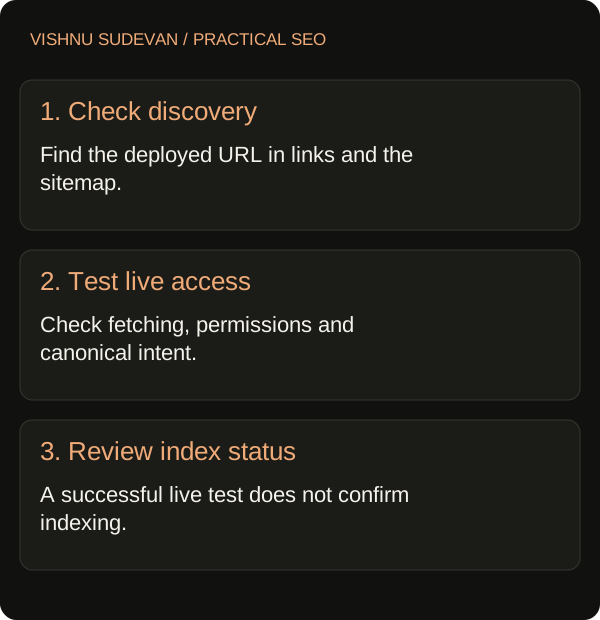
What should you check first?
Inspect the exact published URL in Search Console. Save the status and any reported crawl date, then run a live test to check current access. The indexed report and live test answer different questions; a successful live test does not establish that the page is indexed or that Google will select its declared canonical. Google’s URL Inspection guide
Start an investigation note with these fields:
| Field | What to record |
|---|---|
| Published URL | The final address visitors should use |
| Publication | When the page actually went live |
| Index status | The exact status shown, with the inspection date |
| Last reported crawl | A date, or “not reported” |
| Live test | Result and test time |
| Next action | One check or repair, with an owner |
Avoid writing “indexing issue” as the diagnosis. That describes the symptom without explaining what anyone should do next.
Is the report about the URL you want indexed?
Open the examples behind an exclusion count before commissioning changes. Read the complete URL, including its hostname, path and parameters.
Your intended article, a redirected address and an XML sitemap are different resources. A useful triage question is: would this URL make sense as the result someone clicks to read the article?
For an illustrative example, imagine a report with one excluded URL. The owner assumes the missing item is yesterday’s guide. Opening the examples reveals /sitemap.xml instead. Rewriting the guide would not address the observation in that report. The useful next step is to inspect the guide itself and check sitemap processing separately.
This example illustrates a diagnostic mistake; it is not evidence of a traffic improvement or a client result.
Can someone find the page through your website?
Walk the route a reader would take. Start at the blog listing or a relevant topic page and follow its link to the article. Confirm that the destination is the intended production URL and that the article can be read.
Then review the sitemap you actually deployed. Check whether it contains that same URL, rather than relying on a local build or an older export. Google recommends listing the canonical URLs you want shown in search; sitemap submission is a hint, not a guarantee that Google will crawl or use it. Google’s sitemap guidance
Keep a short release record:
- Which page links to the new article?
- Does that link reach the correct destination?
- Is the intended URL present in the deployed sitemap?
- When did Search Console last report reading that sitemap?
These checks help you distinguish “we generated the right files” from “the right files reached the live website.”
What does the live test tell you?
Review crawl permission, page fetch, indexing permission and the declared canonical. Inspect the tested page when you need to see what Google’s inspection tool received. Google documents that the live test has limits, including checks it does not make for quality, manual actions and other eligibility conditions. URL Inspection test limitations
Use the evidence to choose a specific response:
| Observation | Next investigation |
|---|---|
| The wrong URL was inspected | Inspect the intended production address |
| Fetch failed | Investigate the reported failure and whether it is reproducible |
| Indexing is disallowed unexpectedly | Locate the instruction responsible and confirm the intended setting |
| Declared canonical points elsewhere | Check whether that destination is deliberate |
| Live access passes but there is no indexed version | Record the result and continue discovery and content review |
A pass is useful evidence about access. It should not become a claim that the page has earned a ranking.
A page-level noindex instruction must be available to Google’s crawler to be read. Blocking the same page in robots.txt can prevent that. Google’s noindex guidance
For the wider distinction between crawl access and product-use settings, see choosing controls for AI crawlers.
When should you request indexing?
For an individual new or meaningfully updated page, use URL Inspection to request a crawl once you have checked the intended URL. Google says crawling may take days to weeks, inclusion is not guaranteed, and repeatedly requesting the same URL does not make it crawl faster. Google’s recrawl guidance
Record the request date. Then choose a review date and a clear reason to act sooner, such as a newly discovered deployment error. Repeatedly pressing the button gives you less useful information than keeping a clean record of what changed.
What if access passes but the page stays unindexed?
Review the page’s job before adding more words. Write down the reader’s question, the answer this page provides and what it contributes beyond existing pages on the site.
I would ask:
- Is this a distinct guide, or a lightly rewritten version of another page?
- Does the reader leave with an answer or a usable next step?
- Are important claims supported by evidence the reader can inspect?
- Are we trying to make one page serve several unrelated purposes?
These are editorial review questions, not a diagnosis of Google’s decision. Change a page when you can name the improvement and explain its value. “Make it longer so it gets indexed” is not a useful brief.
For a structured way to assess missing answers, see my guide to content audits and citation evidence.
Close the investigation with a decision
Leave the next reviewer a short note: what you checked, what the evidence supports, what you changed and what remains unresolved. Keep technical repairs separate from editorial improvements so you can explain why each was made.
A useful outcome might simply be: “The published URL is accessible, the declared canonical is correct, and we requested a crawl. Indexing remains pending. No content rewrite is justified by the current evidence.”
If several important pages are affected, bring the URLs and investigation notes to a 30-minute consultation. That gives us a concrete starting point for deciding what needs attention.
Official guidance reviewed on 26 October 2026. Examples are illustrative; the workflow is a recommendation, not a claim of client results.

Senior SEO, AEO & GEO consultant and practitioner. I write about search strategy, the tools I build and lessons from hands-on work.
More about my work →GET HELP WITH THE INVESTIGATION
Bring your report. Find the next check.
Discuss your search-performance questions and the evidence needed to investigate them.
Book a 30-minute conversationNeed help with a wider search challenge? Explore SEO consulting.