Your weekly report shows more clicks in Google Search Console. You open Google Analytics 4 (GA4), expecting to see more visits from Google, but the sessions are almost flat. Did Analytics miss the visitors? Was the Search Console spike fake?
Neither conclusion follows from the two totals alone. Search Console counts clicks on your result in Google Search. GA4 counts sessions: periods of activity it records on your site. They observe different parts of a visit, use different rules, and can report a day in different time zones. The useful task is to find where the gap appeared before naming a cause.
First, compare the right reports
In Search Console, open Performance → Search results. Select the Web search type and a complete date range. Note the property and any country, device or page filters. Avoid treating a day marked as preliminary like a finished day. Google explains how preliminary Performance data works.
In GA4, open Reports → Acquisition → Traffic acquisition. Use Session source / medium and look for google / organic. Compare sessions, not all users or all channels. GA4's Organic Search channel can include other search engines, so its total is a wider comparison. Google documents the report and its dimensions.
Use the same calendar dates, but remember that matching dates do not make the daily numbers identical. Search Console labels days using California local time; GA4 uses the property's reporting time zone. A click near midnight can fall on different dates in the two tools. Google lists this among the reasons the tools differ.
If GA4 is not installed or its traffic report is not available, stop at this step. A missing GA4 number cannot confirm or contradict a Search Console increase.
Find the page behind the Search Console change
A site-wide spike is hard to explain. In Search Console, compare the current period with the previous complete period of equal length. Open Pages and look for the URLs behind most of the added clicks. For each affected page, check Devices and Countries. Then open Queries while the page filter remains in place.
Do not expect the visible query rows to add up to the page or property total. Search Console omits some queries for privacy and stores only top rows. A gap between those rows and the chart is not, by itself, evidence of fake clicks. Google explains the data limits.
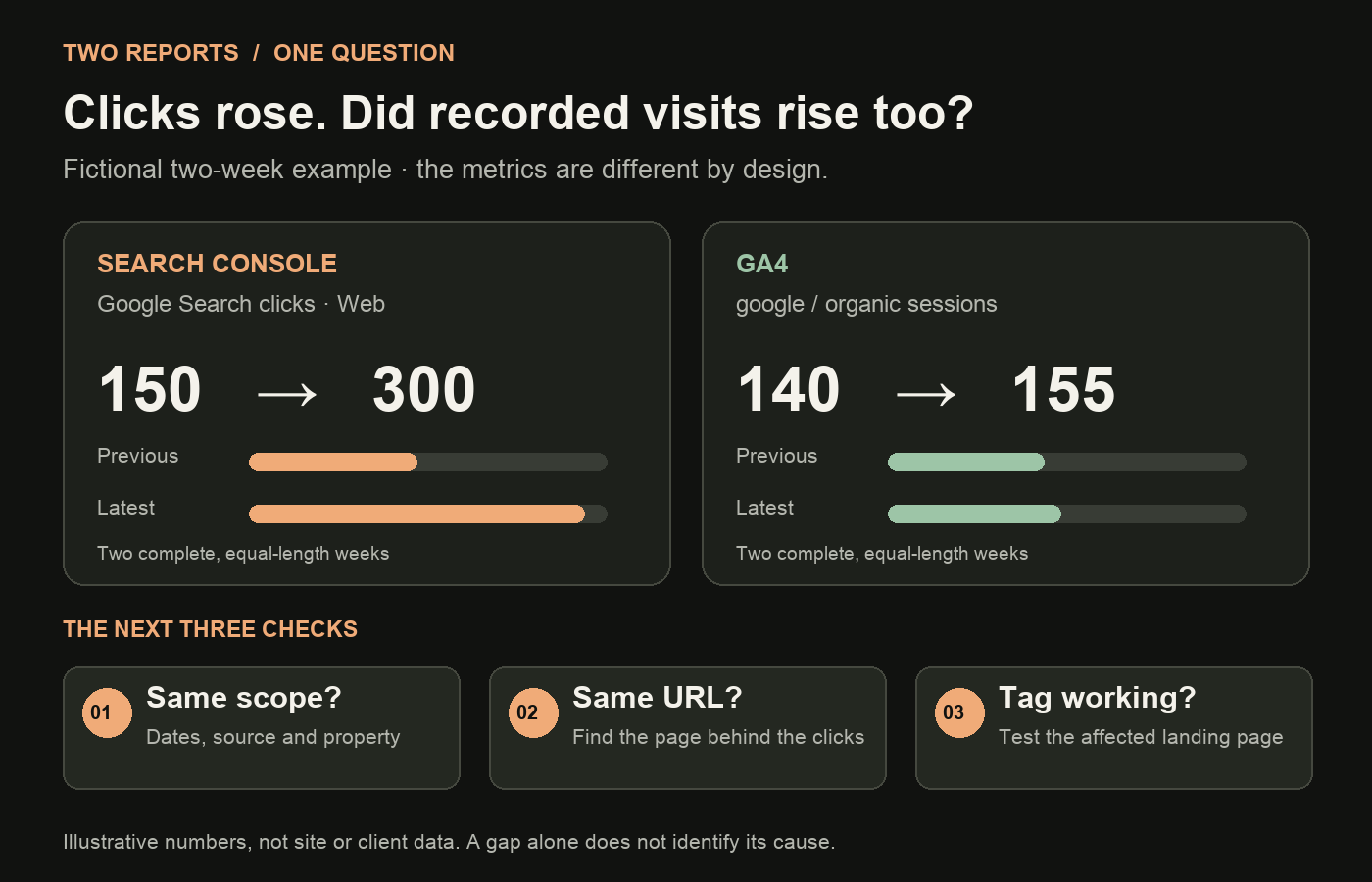
For an illustrative example, imagine a site moves from 150 to 300 Search Console clicks across two complete weeks. GA4's google / organic sessions move from 140 to 155. In Search Console, one guide accounts for 120 of the 150 extra clicks. Start with that guide. The figures are invented to show the investigation; they are not results from this site or a client.
| Observation | Next check |
|---|---|
| Extra clicks are concentrated on one URL | Compare that URL's country, device and visible queries. |
| Extra clicks are spread across many URLs | Check the report's filters and dates, then look for a site-wide pattern. |
| GA4 sessions rose on the affected landing page | The property-level GA4 total may be hiding a shift between pages or sources. |
| GA4 shows little or no activity on the affected page | Check whether measurement works on that page before explaining the gap. |
The goal is to narrow the question to a URL and audience, not to force the totals to match.
Check the landing page in GA4
In GA4, keep google / organic selected and inspect the landing page for the URL that changed in Search Console. A landing page is the first page of a session. Check whether that page has sessions in the same period, and whether its device or country pattern resembles the Search Console change.
Do not compare Search Console's property total with GA4's sessions for one page. Keep the scope aligned. If a redirect changes the landing URL, follow it and compare the final page too. Also confirm that both tools cover the same website and that you have selected the intended GA4 web stream and Search Console property. Google's Search Console–GA4 integration guidance notes that the linked data stream and property should cover the same pages.
You can use GA4's Google Organic Search Traffic report if the Search Console link and report collection are set up. It shows landing pages with Search Console and Analytics metrics side by side. It does not turn clicks into sessions or erase their measurement differences.
To use GA4 for a page-level decision once you accept the gap, see how to review organic landing pages.
Test measurement before blaming the traffic
If the affected page has Search Console clicks but little GA4 activity, test the measurement path. Open the live page on a phone and desktop. Confirm that it resolves to the expected URL and that the GA4 tag—the code that sends measurement data—is present on that page. Use GA4 Realtime or Tag Assistant to check whether a test visit is recorded. Google's tag troubleshooting guide says missing, incorrect or unpublished tags can leave pages without Analytics data; it also notes processing delays.
If the site uses a consent banner or consent mode, check how the Analytics tag behaves after a visitor makes a choice. Do this with the site's actual setup and privacy requirements in mind. A tracking gap is a possible explanation, not something to infer from the two charts alone. Google's consent-mode troubleshooting guide covers implementation checks.
Search Console and Analytics can still differ when both are working. Search Console applies its own processing; Analytics depends on site-side measurement and JavaScript-enabled visits. The comparison is a diagnostic aid, not a reconciliation exercise. Google's Search Console data guide describes these limits.
What if the spike still has no clear explanation?
Write down what you can establish: the complete dates, affected URLs, countries and devices, whether GA4 records those landing pages, and whether the tag works on a test visit. Then check a second complete period. If the mismatch is large or persists, inspect server or CDN request logs with the person who manages the site, and review any platform notices or data anomalies relevant to those dates. For a focused way to inspect those requests, see what to check in Google Search referrers in server logs.
Do not label the clicks “bots” merely because GA4 sessions did not rise. The two systems do not measure the same thing, and the reports alone cannot identify who clicked. Likewise, do not report the Search Console increase as a proven rise in engaged visitors. Say what changed in each tool and what remains unknown.
A short note might read: “Search Console Web clicks increased on one guide in the selected complete weeks. GA4 google / organic sessions for that landing page did not increase by the same amount. The page's tag worked in a test visit. Cause unresolved; review the next complete week and request log evidence if the pattern continues.” This is a model wording example, not a finding about a real site.
If the change turns out to be concentrated on mobile, my mobile-clicks diagnostic guide shows how to follow the device change to a page and query. For a broader look at why I built a tool to test Search Console patterns rather than jump to one explanation, read the GSC anomaly detector story.
If you need a second opinion on a persistent gap, book a 30-minute SEO discussion. Bring the two report views, date ranges and affected URL; that is enough to start with evidence rather than guesses.
Sources: Google Search Console and Analytics Help on clicks, sessions, reporting scope, time zones, data limits, tags and consent. Numeric example and image are fictional. Checked 7 November 2026.

Senior SEO, AEO & GEO consultant and practitioner. I write about search strategy, the tools I build and lessons from hands-on work.
More about my work →Need help with a wider search challenge? Explore SEO consulting.