By Vishnu Sudevan
You have a list of pages that could use work. One has lost clicks. Another gets impressions but few visits. A third still brings enquiries, but its advice is getting old. Where do you start?
Choose the page with a clear reader need and a specific problem you can fix. Search Console helps you find candidates; a quick review of the page, search result and business goal tells you what to do next. You do not need to rewrite the page with the biggest percentage change.
Start with a fair Search Console view
Open Performance → Search results. For text queries in regular Google Search, use the Web: text-based search type. Choose Date → Compare and select two similar, complete periods. Keep the country, device and other filters the same. Note the exact dates and the report's last update. The newest data can be preliminary, so avoid making a decision from a partial day. Google explains the search types and preliminary data.
Turn on clicks and impressions, then open Pages. Sort by the difference between periods to build a shortlist. A page that lost 20 clicks may matter more than one that lost 80% of its clicks if the latter went from five clicks to one. A valuable service page may also deserve attention when its traffic is smaller than a broad blog post's.
The property chart and Pages table can have different totals: Google aggregates the chart by property and the Pages table by page. Google explains the chart and table groupings. The Queries table can also omit rare searches for privacy, and the interface shows at most 1,000 rows. Google explains these limits. Use each view to narrow the question.
Put each candidate through four checks
For each page on your shortlist, ask:
- Does the page still serve the task? Read it as a visitor. Is the answer accurate, complete enough and easy to act on? If it already performs well, Google advises against radical changes in response to a small fluctuation.
- What changed in search? Add a URL filter for the page, then open Queries. Compare the important queries and check whether impressions, clicks or both changed. If a new phrase appears, the new-keywords guide helps decide whether it belongs on that page. Look at country and device when the change seems confined to one audience. For a possible seasonal drop, set Date → Last 16 months, if your site has that history, or compare year over year to see whether the pattern repeats. Then check leading queries in Google Trends for a wider change in interest. Google recommends both checks.
- Is there a verified obstacle? Check indexing and the live URL if impressions have vanished. If the page still appears but gets fewer clicks, inspect the actual result in the market you serve and compare its promise with the page. A manual search is one snapshot; results vary. Do not assume that a lower click-through rate proves the title is bad. Google's traffic-drop guide recommends narrowing a decline by page, query, country and device before naming a cause.
- Would fixing it matter to your audience or business? A page tied to a common reader task, useful service or qualified enquiry can be a stronger candidate than a broad post with more impressions. Record your reason; Search Console cannot calculate that editorial value for you.
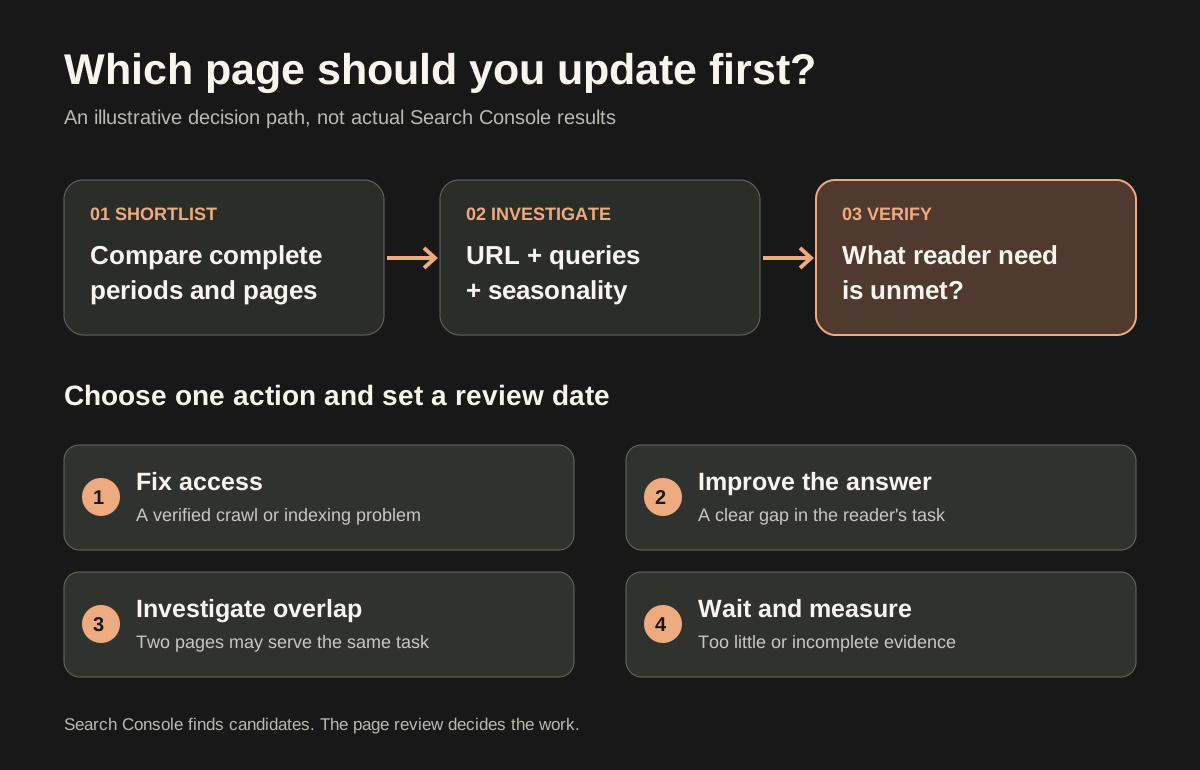
Illustrative decision path. A Search Console change creates a shortlist; a verified reader problem determines the action.
Choose the next action
| What you find | First action |
|---|---|
| The page is blocked, unavailable or not indexed when it should be | Fix access or indexing before editing prose. Use the new-page discovery checklist for a recently published URL. |
| A relevant query still brings impressions, but the page misses part of the reader's task | Improve the existing page with the missing explanation, example or next step. Preserve what already works. Once you have chosen the page, the next step is how to improve it. |
| Two pages answer nearly the same task and appear for overlapping queries | Investigate overlap and decide which page should be the main answer before making separate edits. Similar queries alone do not prove that two pages compete. |
| The change is tiny, the page is new, or the data is incomplete | Wait and measure. Set a review date and state what evidence would change your decision. |
If you find that impressions rose but clicks stayed flat, the impressions-and-clicks guide walks through that narrower pattern. If you need to decide whether a query deserves a new page, use the keyword-to-page plan before adding another URL.
A worked example: which page would you choose?
Illustrative example, not data from this site or a client. Imagine an SEO consultant reviewing two complete 28-day periods. Four URLs are on the shortlist:
| Page | Search Console observation | What the page review finds | Decision |
|---|---|---|---|
| A broad glossary | Clicks fall from 5 to 1 | The explanation still answers the visible queries | Wait; the four-click change is too small to justify a rewrite. |
| A service page | Clicks fall from 38 to 26 | An important query still shows the page, but the page lacks a clear description of who the service helps | Improve this page first; it has a specific reader gap and a relevant business purpose. |
| A newly published guide | Impressions rise from 4 to 18 | The page is accessible and answers the task | Give it more time; do not treat early impressions as a failure. |
| A tools article | Clicks fall from 60 to 42 | Most of the change comes from a possibly seasonal query; the page remains accurate | Compare with the prior year and check that query in Google Trends before editing. |
The service page wins because the review found a fixable mismatch with a valuable reader task. Before editing, check representative search results and write down what the page will add. After the change, note the date and compare like-for-like periods later. You can also add a Search Console annotation on the edit date to give the chart context. A later rise or fall cannot establish cause on its own; demand, competitors and the result layout can also change. Google cautions about attributing performance changes to page edits.
Keep a one-page decision note
Copy this short note for the page you choose:
| Field | Your note |
|---|---|
| Property and search type | |
| Period A and Period B dates | |
| Filters used | |
| Chosen URL | |
| Relevant queries | |
| What the page review found | |
| Action: fix access, improve, investigate or wait | |
| Owner | |
| Review date | |
| Evidence that would change the decision |
For a newer site with very little Search Console data, start with a page that matters to real visitors and has an obvious gap you can verify. You do not need to wait for a traffic decline to make a useful page clearer. Do avoid calling a handful of impressions a trend.
The first page to update is the one where evidence, reader need and a feasible improvement meet. Search Console points you to the question; your review determines the work. If you want a second view on your shortlist, book an SEO discussion and bring the URLs and comparison dates.
Sources: Google Search Console Performance report overview · Performance report tasks · Search Console data limits · Debugging Search traffic drops · Search Console annotations
Reviewed 9 November 2026.
Google Search Console documentation reviewed 9 November 2026. The worked example and diagram are illustrative, not site or client results.

Senior SEO, AEO & GEO consultant and practitioner. I write about search strategy, the tools I build and lessons from hands-on work.
More about my work →Need help with a wider search challenge? Explore SEO consulting.